The security playbook for today’s operators
Max Tagher is the co-founder and CTO of Mercury.
For the last ten years, every IT department had a simple rule for avoiding a phishing attack: If the link is suspicious, don’t click on it. But what if links no longer look suspicious? With the help of AI, phishing emails no longer give themselves away, and instead, they could arrive from your CFO’s actual address, reference a real invoice, and even parrot their voice.
The old defaults, like a strong password or even two-factor authentication (2FA), may have been enough before advancements in AI over the last few years. The good news is Mercury already has some of the strongest security in the industry: Passkeys, dark web monitoring, real-time scam alerts, and more. The gap between a secure account and a more vulnerable one is small. And closing that gap only takes a few small upgrades that you can accomplish in a few minutes.
This step-by-step guide will give you the latest tactics for protecting your business in 2026. Configure your account once, or audit your existing measures to be sure your strategies are up to date.
1) Protecting your identity & account access
Most account takeovers start with your login — not because your account is poorly defended, but because login credentials can be stolen, guessed, or intercepted. The fix isn’t a stronger password, or even two-factor authentication (2FA). It’s removing the password entirely.
Switch to a passkey
A passkey lets you sign in to Mercury the same way you unlock your phone — with facial recognition or fingerprint. There’s nothing to steal, guess, or intercept. Unlike a password, it’s tied to a physical device you control. Unlike a 2FA code, it can’t be forwarded to an attacker or entered into a website masquerading as one you think you can trust.
Passkeys make your account much more resistant to phishing. You can’t enter your passkey on a site that isn’t Mercury, because the passkey itself won’t work there. With passkey-only login available when you create your account, Mercury makes it easy to build strong security practices from the start.
How to set up a passkey in Mercury
- Go to Settings → SecurityOpens in new tab
- Select Add passkeyOpens in new tab or Add passkey via QR code to store a passkey on a mobile device
- Add a passkey on a second trusted device in case you lose or replace a device. We strongly recommend this step to ensure you don’t get locked out.
Then go passkey-only
Once you’re signing in with a passkey, 2FA codes aren’t just unnecessary, they can become a liability. SMS codes and authenticator app codes can be intercepted, forwarded, or phished. Passkeys can’t. Going passkey-only means deleting your 2FA methods so that passkey sign-in is the only way in.
How to delete 2FA
- Go to Settings → Security
- Under Two-Factor Authentication (2FA), select Remove for all line items
A few things to know before you delete 2FA
- Backup codes still work for account recovery
- You can still manage devices in Security settings
- If you lose access to all passkey-enabled devices and don’t have a cloud backup (iCloud, Google Password Manager, 1Password), contact support to recover your account. The easier solution: Add a passkey to a second device before you delete your 2FA codes. Don't skip this step.
SMS for 2FA isn’t enough
If you’re still using a 6-digit text message code to log in anywhere (e.g., your email, your payroll tool) it’s worth changing. SMS 2FA can be intercepted through SIM-swapping attacks and isn’t resistant to phishing. Authenticator apps are better. Passkeys are better still. Mercury doesn’t offer SMS 2FA for exactly this reason.
Get scam alerts on Mercury
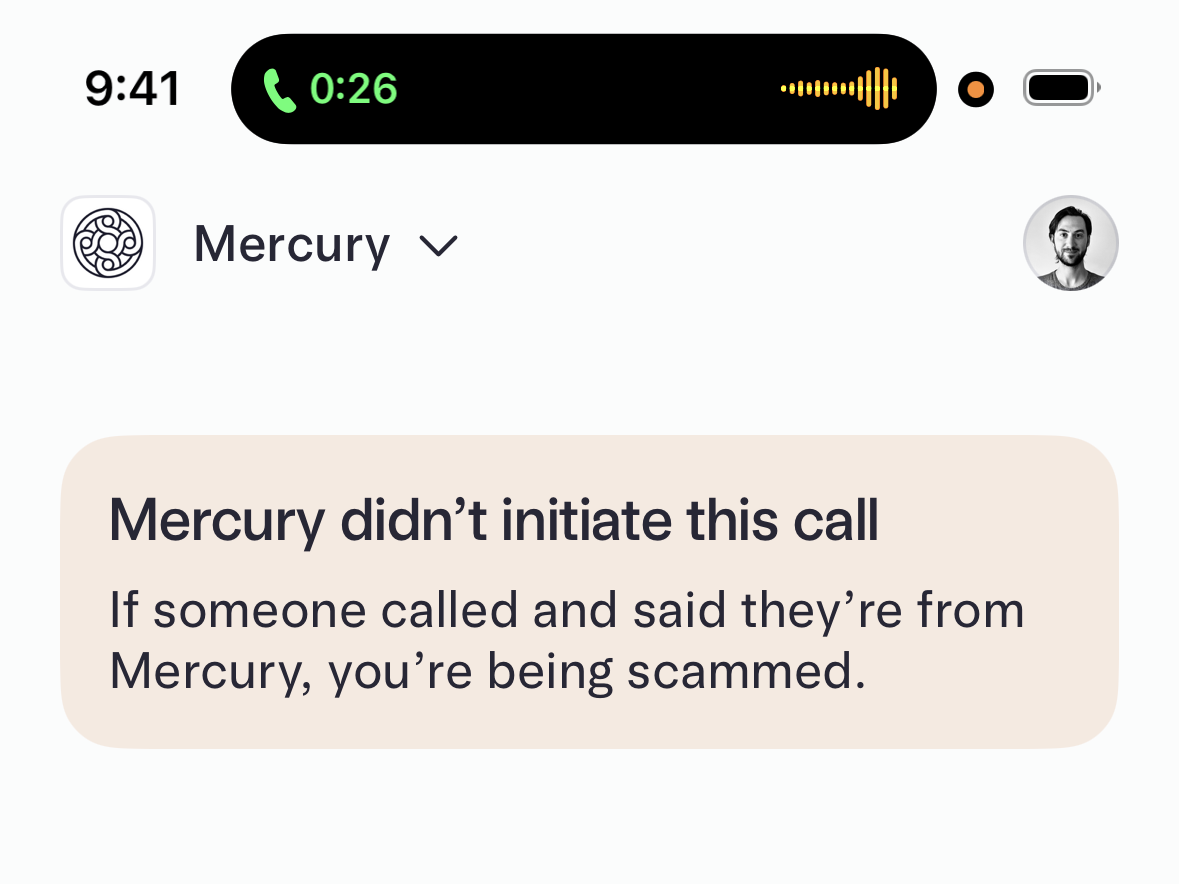
Mercury’s mobile app includes real-time alerts for potential scam calls. If you open the Mercury app while on the phone with someone impersonating Mercury support, the in-app alert flags the risk before you share anything.
2) Putting guardrails in place for money movement
The most common financial fraud targeting businesses isn’t actually a hacked login. It’s an unauthorized payment. These could be initiated either by someone who shouldn’t have had access, or by a fraudulent vendor instruction that slipped through without a second set of eyes.
How to enable payment approvals
- Go to Settings → Approval Rules
- Set dollar thresholds that require a second approval
- Assign the right team members as approvers
Require multi-admin approval for large payments
For high-value transactions, requiring a second admin to approve a move of funds is a layer of protection that’s hard to circumvent, even if an attacker gains access to one account. It also protects against malware attacks, because if malicious software on one device attempts to initiate a payment, that second approval requirement can stop it before it clears. This is how serious finance operations run. Not as a sign of distrust, but as a standard that protects everyone, including the person initiating the payment.
Set up ACH authorization
ACH authorization lets you control which vendors can initiate ACH debits from your account. When a debit is initiated, you get notified — and you can set up a review window before it's auto-approved or auto-rejected. This is especially useful if you have a finance team: Rather than a single person approving everything, ACH authorization builds accountability into the process itself.
Mercury’s recommendation:
- Set ACH authorization to automatically approve for established vendors to avoid missed payments
- Review and authorize the vendors you work with regularly
- Any unfamiliar debit will trigger a notification before it clears
3) Sharing the right amount of spending power
As your team grows, so does the surface area for financial risk. More users with access to accounts or cards means more potential entry points. The solution isn’t restricting access arbitrarily — it’s making sure every person has the right amount for their role.
Audit roles and permissions
Most businesses set permissions when they onboard someone and never revisit them. People change roles. Contractors finish projects. Employees leave. If you haven't audited your team’s permissions recently, set aside a few minutes to take a look.
Here’s what to review:
- Who has admin access and send-money privileges?
- Do those permissions still reflect their current role?
- Are there former team members still listed?
Mercury lets you create custom roles so every team member has the right access for their function. Audit team permissions at least once a year.
Set spend limits
Card spend limits — daily, weekly, or monthly — reduce risk without reducing your team’s ability to do their work. For most roles, a reasonable limit is set once and never needs to be touched. For high-risk spending categories, it’s a useful control that runs in the background.
Use merchant or category-locked cards
For specific vendors or spending categories like software subscriptions, travel, or office supplies, a card locked to that merchant or category prevents misuse by design. You don’t have to audit it. It simply can’t be used anywhere you haven’t enabled. This can be configured from the card details pane in Mercury or when a new card is created.
4) Making sure nothing gets by your inbox
Banking security doesn't stop at your banking login. The most common ways founders get compromised aren’t through their banking logins — it’s through their email or vendor fraud. This is also where AI-assisted attacks are most active: A compromised vendor sending an email rewritten by AI to match their tone and phrasing could be nearly impossible to catch on your own.
Secure your email login
Your email account controls access to almost everything else. Password reset links go there. Wire instructions get sent there. If an attacker gets into your email, they often don't need to touch your banking credentials at all.
The most important security action many founders can take has nothing to do with Mercury — it’s adding a passkey or authenticator-based 2FA to their email provider. If your email is still protected only by a password, that’s the first thing to fix.
Verify changed vendor payment information by phone
Vendor payment fraud is a simple and devastating attack where a fraudster compromises a vendor’s email, then sends you updated wire instructions that route to their account instead. The safeguard is equally simple: If a vendor sends you new payment details, verify the change by phone — using a number you already have on file, not one included in the email. A two-minute call eliminates one of the highest-risk fraud scenarios businesses face.
The short version
If you do nothing else this week, focus on these five things:
- Set up a passkey in Mercury, then add it to a second device — this prevents you from getting locked out.
- Delete your 2FA methods once you’re passkey-only.
- Audit who on your team has admin access and payment privileges.
- Set up ACH authorization if you have a finance team.
- Add a passkey or authenticator app to your email login.
Security is the kind of thing that feels optional right up until it isn’t. Mercury is already built with the industry’s strongest phishing resistance. These decisions only strengthen that foundation, and each only takes a few moments to configure. After that, they run quietly in the background, protecting everything you’ve built.
About the author
Max Tagher is the co-founder and CTO of Mercury.
Share article
Related reads
Leveraging payment automation to optimize your startup’s AP processes
Strategies for streamlining subscription management and optimizing spend

Timing your first finance hire and finding the right person for the job